 Declaring Variables
This page describes practices you should use and practices you should
avoid when declaring variables in VBA code.


Nearly all non-trivial VBA code involves declaring variables. While VBA allows a great deal of
flexiblity in declaring your variables, this flexiblity can easily lead to poor coding practices.
This page describes practices you should embrace regarding variable declaration. While adopting these
practices can lead to more typing, following them makes code run faster, and makes the code easier
to debug and maintain.
By default, VBA doesn't require that you declare your variables using the Dim statement. If the
compiler encounters a name that it doesn't recognize as an existing variable, one of the VBA reserved words,
or a property or method of a referenced typelib, it will create a new variable by that name. While this may seem
convenient, it can lead to bugs in the code that are difficult to find (although once found they are simple to fix). Suppose
you declare a variable with the name Index1 and later misspell that name as
Idnex1, the compiler will not flag that as an error. Instead, it will
create a new variable named Idnex1 and initialize it to an empty string, a value of 0, or
a Nothing object reference, depending on the context in which it is used. This means that the (correct) variable
Index1 will not contain the expected value. If there is a large amount of code between
the initial declaration of the Index1 variable and the point at which it was misspelled as
Idnex1, it will be hard to track down just what is wrong. This is only made worse by
the mindset when reading code. Your brain "knows" that the proper name is Index1 and you might
read right over Idnex1 without noticing the error.
You can prevent this type of mistake by requiring that all variables be declared with a Dim
statement. As the first line of code in the module, above and before any other lines, use:
Option Explicit
This statement requires that all variables be declared using a Dim statement. Returning to the
problem described above, the compiler will throw an error when it encounters the misspelled Idnex1
variable, alerting you to the problem. The code will not execute at all until the error is fixed.
You can set an option in the VBA Editor that will automatically add an Option Explicit directive
in all newly created code modules (but not retroactively to existing code modules -- this must be done manually). In
the VBA Editor, go to the Tools menu, choose Options and then select the Editor tab, shown below.
There, check the Require Variable Declaration option.
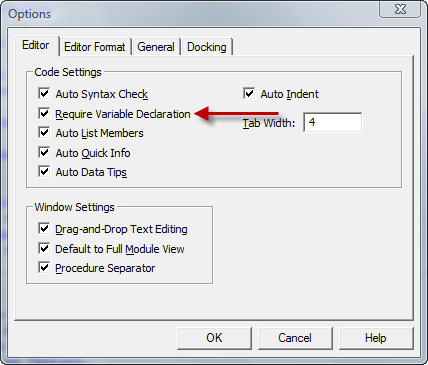 |
Setting the Require Variable Declaration option automatically inserts
Option Explicit in new code modules. |
Most of the time, you should declare your variables with specific data types, such as String,
Long, or Double. VBA supports the Variant
data type that can hold any type of data. If you omit the As Type clause in a variable
declaration, Variant is the default type. While this may seem useful, it increases processing
time when encountered in code because behind the scenes, the compiler has added no small amount of code to test what
type of data is actually stored in the variable. Moreover, using a Variant can mask possible
Type Mismatch errors that should be caught during testing. Instead of using a Variant
type, declare the variable with a specific data type.
This is not to say that Variant types are always undesirable. The can and do serve a purpose. As
an example, consider the return type of the Application.GetSaveAsFilename method. If the user
cancels out of the dialog, the method returns a Boolean type with a value of
False. If the MultiSelect parameter is False,
the method returns a String. If the MultiSelect parameter is
True, the method returns an array of String variables. By returning
a Variant whose type can be tested, the GetSaveAsFilename can
be quite flexible, as shown in the following code:
Dim V As Variant
Dim N As Long

V = Application.GetOpenFilename(MultiSelect:=True)
If IsArray(V) = True Then
    For N = LBound(V) To UBound(V)
        Debug.Print "Files selected: (" & CStr(N) & ")"
        Debug.Print "File: " & CStr(N), V(N)
    Next N
Else
    If V = False Then
        Debug.Print "No file name selected."
    Else
        Debug.Print "One file selected: " & V
    End If
End If
For object type variables, it is possible to include the New keyword in the
Dim statement. Doing so create what is called an auto-instancing variable.
Again, while this may seem convenient, it should be avoided. Contrary to
what some programmers may believe, the object isn't created when the variable declaration is processed. Instead, the
object is created when it is first encountered in the code. This means that, first, you have limited control
when an object is created. Second, it means that you cannot test whether an object is Nothing,
a common test within code and a common testing and diagnostic technique. If the compiler's output were in VBA
code, the code to handle auto-instancing variables would look like the following:
Dim FSO As New Scripting.FileSystemObject
'''''''''''
' more code
'''''''''''
If FSO Is Nothing Then
Set FSO = New Scripting.FileSystemObject
End If
Here, simply testing FSO for Nothing causes the
object to be created and therefore FSO will never test properly for the
Nothing state. Instead of using New in the
variable's declaration, use the Set New syntax:
Dim FSO As Scripting.FileSystemObject
Set FSO = New Scripting.FileSystemObject
VBA allows declaring more than one variable with a single Dim statement.
I don't like this for stylistic reasons, but others do prefer it. However, it is important
to remember how variables will be typed. Consider the following code:
Dim J, K, L As Long
You may think that all three variables are declared as Long types.
This is not the case. Only L is typed as a Long. The
variables J and K are typed as Variant.
This declaration is functionally equivalent to the following:
Dim J As Variant, K As Variant, L As Long
You should use the As Type modifier for each variable declared with the
Dim statement:
Dim J As Long, K As Long, L As Long
When you declare an array statically (with the bounds in the Dim statement) or
use ReDim to set the bounds, VBA allows you to specify only an upper bound, rather
than both a lower and upper bound. This approach should be used with caution. By default, the lower bound
of an array is 0, so an array declaration like
Dim Arr(1) As Long
creates an array with two elements. However, you can override the default lower bound for all arrays
in the module with a compiler option. For example,
Option Base 1
specifies that all arrays without an explicit lower bound use 1 as the lower bound. If you then declare
an array as above, Dim Arr(1) As Long, you've created an array with a single
element. This can cause problems when copying code from one module to another. To avoid these problems,
you should always declare the lower bound of an array that you create and you should always use the
LBound function to get the lower bound of an array.
Related to the array bounds problem described above is how to govern loops that iterate through an array. You
should always use LBound and UBound to start and end the
loop at the correct index values. Consider the following:
For N = 1 To UBound(Arr)
Next N
Depending on how the array was declared and the presence of or value of an Option Base directive, the
first element, Arr(0) may be missed. Instead, use LBound and
UBound to get the array bounds:
For N = LBound(Arr) To UBound(Arr)
Next N
Coding style is personal to each developer. Everyone has their own prefered methods
and idioms. However, by using the guidelines set forth above, you can make your code
more robust, faster, and easier to debug and maintain.
Many programmers prefer to use what is called Hungarian Notation (so named because the originator
of this method was Hungarian-born Charles Simonyi, first at Xerox PARC and later a top level software architect at
Microsoft). In Hungarian Notation, every variable name begins with letters that identify the data type. For
example, an Integer type variable would be named intCounter,
where the int prefix indicates that this is an Integer type.
I have never adopted Hungarian Notation in straight VBA code, but I always use it when naming controls on a
form. If you like the idea behind Hungarian Notation, I encourage you to use it. Just be consistent -- once you
decide on a set of identifier prefixes, use them consistently in all your code.
 |
This page last updated: 11-March-2008. |